If you’re searching for a reliable way to handle aws data migration service workloads with minimal downtime, AWS Database Migration Service (DMS) is one of the most production-proven tools available today.
Whether you’re building a data lake, modernizing legacy systems, or enabling near real-time analytics, understanding how to migrate PostgreSQL database using AWS DMS can significantly accelerate your architecture.
This guide breaks down the fundamentals, architecture, and a practical migration approach—while also showing how you can automate everything with a ready-to-use deployment script.
What is AWS Data Migration Service (DMS)?
AWS data migration service (AWS DMS) is a fully managed service designed to migrate and replicate databases with minimal downtime. It supports both homogeneous (PostgreSQL → PostgreSQL) and heterogeneous (PostgreSQL → S3, Redshift, etc.) migrations.
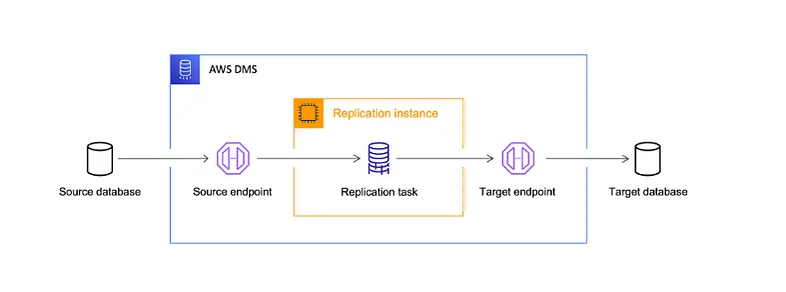
At its core, DMS works by connecting a source and a target, then continuously replicating data using a managed compute layer.
Key Capabilities:
- Full load migration (bulk data transfer)
- Change Data Capture (CDC) for ongoing replication
- Near real-time synchronization
- Multi-AZ support for high availability
- Migration across on-prem, cloud, and hybrid systems
Core Components of AWS DMS Architecture
To truly understand data migration, you need clarity on how DMS is structured:
1. Replication Instance
This is the compute engine that performs the migration.
- Runs inside your VPC
- Handles data extraction, transformation, and loading
- Scalable based on workload size
2. Source Endpoint
Defines the connection to your source system (e.g., PostgreSQL).
- Includes hostname, port, credentials
- Requires proper permissions and network access
3. Target Endpoint
Defines the destination system (e.g., Amazon S3, Amazon Kinesis).
- Supports multiple targets including S3, Redshift, Kinesis, etc.
4. Replication Task
The actual job that performs migration.
- Full load only
- CDC only
- Full load + CDC (most common)
Why PostgreSQL to S3 Migration is So Popular
One of the most searched use cases is: how to migrate PostgreSQL database using AWS DMS
This is because:
- PostgreSQL is widely used for OLTP systems
- S3 acts as a scalable data lake
- Enables analytics via Athena, Glue, and downstream pipelines
DMS supports continuous replication from PostgreSQL to S3, including CDC, which allows near real-time data lake ingestion.
Step-by-Step: How to Migrate PostgreSQL Database Using AWS DMS
Step 1: Create a Replication Instance
- Choose instance class (e.g.,
dms.c5.xlarge) - Deploy inside the same VPC as source/target if possible
- Enable Multi-AZ for production
Step 2: Configure PostgreSQL Source
- Enable logical replication
- Create a user with required permissions
- Ensure network connectivity and SSL if required
Step 3: Create Source Endpoint
- Engine: PostgreSQL
- Provide DB credentials and connection details
Step 4: Configure S3 Target
- Create S3 bucket
- Attach IAM role with write permissions
- Configure output format (CSV / Parquet)
Step 5: Create Target Endpoint
- Engine: S3
- Define bucket name, folder structure, compression
Step 6: Create Migration Task
- Select:
- Full load + CDC (recommended)
- Define table mappings
- Configure parallel load settings
Step 7: Run and Monitor
- Monitor via CloudWatch
- Validate data integrity
- Optimize based on latency and throughput
AWS recommends starting with a larger instance during full load and scaling down during CDC phase.
Performance and Latency Considerations
For production-grade data migration, these factors matter:
- Replication instance sizing (CPU, memory, I/O)
- Network latency between source and AWS
- Parallel load configuration
- CDC lag monitoring
DMS enables near real-time replication with minimal latency using transaction logs, reducing downtime significantly.
Automate Everything with a Deployment Script
Setting up DMS manually is repetitive and error-prone, especially when scaling across environments. We have built a ready-to-use deployment script that:
- Creates replication instance
- Configures endpoints (PostgreSQL → S3)
- Sets up replication tasks
- Applies best-practice configurations
With just a few configuration changes, you can deploy a production-ready pipeline in minutes.
If you’re interested in getting access to this script, please fill up the form at our services page.
Need Help with AWS Data Migration?
If you’re working on:
- Near real-time or real-time data migration
- PostgreSQL to S3 pipelines
- DMS performance tuning
- End-to-end architecture design
You can reach out to our TheCodeWizard Team.
We help teams design, deploy, and optimize aws data migration service pipelines—from architecture to implementation. Mastering how to migrate PostgreSQL database using AWS DMS is not just about moving data—it’s about building scalable, resilient, and future-ready data platforms.
AWS DMS provides the foundation, but the real value comes from:
- Correct architecture decisions
- Proper tuning
- Automation
If you’re planning your next data migration initiative, start with DMS—and scale with confidence.